
FONTS.md (19069B)
1 _(You may browse this at https://github.com/ocornut/imgui/blob/master/docs/FONTS.md or view this file with any Markdown viewer)_ 2 3 ## Dear ImGui: Using Fonts 4 5 The code in imgui.cpp embeds a copy of 'ProggyClean.ttf' (by Tristan Grimmer), 6 a 13 pixels high, pixel-perfect font used by default. We embed it in the source code so you can use Dear ImGui without any file system access. ProggyClean does not scale smoothly, therefore it is recommended that you load your own file when using Dear ImGui in an application aiming to look nice and wanting to support multiple resolutions. 7 8 You may also load external .TTF/.OTF files. 9 In the [misc/fonts/](https://github.com/ocornut/imgui/tree/master/misc/fonts) folder you can find a few suggested fonts, provided as a convenience. 10 11 **Also read the FAQ:** https://www.dearimgui.org/faq (there is a Fonts section!) 12 13 ## Index 14 - [Readme First](#readme-first) 15 - [How should I handle DPI in my application?](#how-should-i-handle-dpi-in-my-application) 16 - [Fonts Loading Instructions](#font-loading-instructions) 17 - [Using Icon Fonts](#using-icon-fonts) 18 - [Using FreeType Rasterizer (imgui_freetype)](#using-freetype-rasterizer-imgui_freetype) 19 - [Using Colorful Glyphs/Emojis](#using-colorful-glyphsemojis) 20 - [Using Custom Glyph Ranges](#using-custom-glyph-ranges) 21 - [Using Custom Colorful Icons](#using-custom-colorful-icons) 22 - [Using Font Data Embedded In Source Code](#using-font-data-embedded-in-source-code) 23 - [About filenames](#about-filenames) 24 - [Credits/Licenses For Fonts Included In Repository](#creditslicenses-for-fonts-included-in-repository) 25 - [Font Links](#font-links) 26 27 --------------------------------------- 28 ## Readme First 29 30 - All loaded fonts glyphs are rendered into a single texture atlas ahead of time. Calling either of `io.Fonts->GetTexDataAsAlpha8()`, `io.Fonts->GetTexDataAsRGBA32()` or `io.Fonts->Build()` will build the atlas. 31 32 - You can use the style editor `ImGui::ShowStyleEditor()` in the "Fonts" section to browse your fonts and understand what's going on if you have an issue. You can also reach it in `Demo->Tools->Style Editor->Fonts`: 33 34 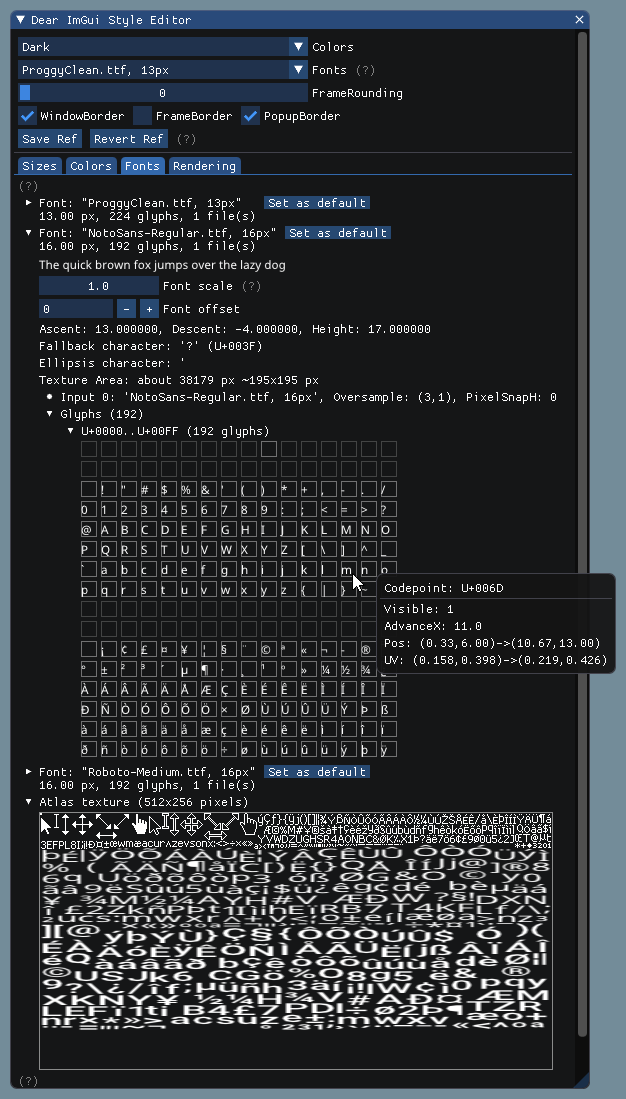 35 36 - Make sure your font ranges data are persistent (available during the calls to `GetTexDataAsAlpha8()`/`GetTexDataAsRGBA32()/`Build()`. 37 38 - Use C++11 u8"my text" syntax to encode literal strings as UTF-8. e.g.: 39 ```cpp 40 u8"hello" 41 u8"こんにちは" // this will be encoded as UTF-8 42 ``` 43 44 ##### [Return to Index](#index) 45 46 ## How should I handle DPI in my application? 47 48 See [FAQ entry](https://github.com/ocornut/imgui/blob/master/docs/FAQ.md#q-how-should-i-handle-dpi-in-my-application). 49 50 ##### [Return to Index](#index) 51 52 53 ## Font Loading Instructions 54 55 **Load default font:** 56 ```cpp 57 ImGuiIO& io = ImGui::GetIO(); 58 io.Fonts->AddFontDefault(); 59 ``` 60 61 62 **Load .TTF/.OTF file with:** 63 ```cpp 64 ImGuiIO& io = ImGui::GetIO(); 65 io.Fonts->AddFontFromFileTTF("font.ttf", size_pixels); 66 ``` 67 If you get an assert stating "Could not load font file!", your font filename is likely incorrect. Read "[About filenames](#about-filenames)" carefully. 68 69 70 **Load multiple fonts:** 71 ```cpp 72 // Init 73 ImGuiIO& io = ImGui::GetIO(); 74 ImFont* font1 = io.Fonts->AddFontFromFileTTF("font.ttf", size_pixels); 75 ImFont* font2 = io.Fonts->AddFontFromFileTTF("anotherfont.otf", size_pixels); 76 ``` 77 ```cpp 78 // In application loop: select font at runtime 79 ImGui::Text("Hello"); // use the default font (which is the first loaded font) 80 ImGui::PushFont(font2); 81 ImGui::Text("Hello with another font"); 82 ImGui::PopFont(); 83 ``` 84 85 86 **For advanced options create a ImFontConfig structure and pass it to the AddFont() function (it will be copied internally):** 87 ```cpp 88 ImFontConfig config; 89 config.OversampleH = 2; 90 config.OversampleV = 1; 91 config.GlyphExtraSpacing.x = 1.0f; 92 ImFont* font = io.Fonts->AddFontFromFileTTF("font.ttf", size_pixels, &config); 93 ``` 94 95 96 **Combine multiple fonts into one:** 97 ```cpp 98 // Load a first font 99 ImFont* font = io.Fonts->AddFontDefault(); 100 101 // Add character ranges and merge into the previous font 102 // The ranges array is not copied by the AddFont* functions and is used lazily 103 // so ensure it is available at the time of building or calling GetTexDataAsRGBA32(). 104 static const ImWchar icons_ranges[] = { 0xf000, 0xf3ff, 0 }; // Will not be copied by AddFont* so keep in scope. 105 ImFontConfig config; 106 config.MergeMode = true; 107 io.Fonts->AddFontFromFileTTF("DroidSans.ttf", 18.0f, &config, io.Fonts->GetGlyphRangesJapanese()); // Merge into first font 108 io.Fonts->AddFontFromFileTTF("fontawesome-webfont.ttf", 18.0f, &config, icons_ranges); // Merge into first font 109 io.Fonts->Build(); 110 ``` 111 112 **Add a fourth parameter to bake specific font ranges only:** 113 114 ```cpp 115 // Basic Latin, Extended Latin 116 io.Fonts->AddFontFromFileTTF("font.ttf", size_pixels, NULL, io.Fonts->GetGlyphRangesDefault()); 117 118 // Default + Selection of 2500 Ideographs used by Simplified Chinese 119 io.Fonts->AddFontFromFileTTF("font.ttf", size_pixels, NULL, io.Fonts->GetGlyphRangesChineseSimplifiedCommon()); 120 121 // Default + Hiragana, Katakana, Half-Width, Selection of 1946 Ideographs 122 io.Fonts->AddFontFromFileTTF("font.ttf", size_pixels, NULL, io.Fonts->GetGlyphRangesJapanese()); 123 ``` 124 See [Using Custom Glyph Ranges](#using-custom-glyph-ranges) section to create your own ranges. 125 126 127 **Example loading and using a Japanese font:** 128 129 ```cpp 130 ImGuiIO& io = ImGui::GetIO(); 131 io.Fonts->AddFontFromFileTTF("NotoSansCJKjp-Medium.otf", 20.0f, NULL, io.Fonts->GetGlyphRangesJapanese()); 132 ``` 133 ```cpp 134 ImGui::Text(u8"こんにちは!テスト %d", 123); 135 if (ImGui::Button(u8"ロード")) 136 { 137 // do stuff 138 } 139 ImGui::InputText("string", buf, IM_ARRAYSIZE(buf)); 140 ImGui::SliderFloat("float", &f, 0.0f, 1.0f); 141 ``` 142 143 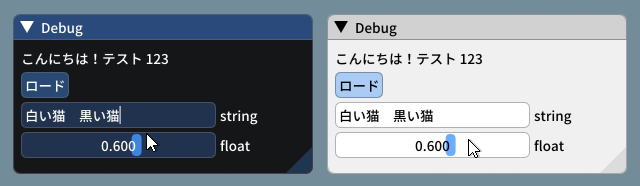 144 <br>_(settings: Dark style (left), Light style (right) / Font: NotoSansCJKjp-Medium, 20px / Rounding: 5)_ 145 146 **Font Atlas too large?** 147 148 - If you have very large number of glyphs or multiple fonts, the texture may become too big for your graphics API. The typical result of failing to upload a texture is if every glyphs appears as white rectangles. 149 - Mind the fact that some graphics drivers have texture size limitation. If you are building a PC application, mind the fact that your users may use hardware with lower limitations than yours. 150 151 Some solutions: 152 153 1. Reduce glyphs ranges by calculating them from source localization data. 154 You can use the `ImFontGlyphRangesBuilder` for this purpose and rebuilding your atlas between frames when new characters are needed. This will be the biggest win! 155 2. You may reduce oversampling, e.g. `font_config.OversampleH = 2`, this will largely reduce your texture size. 156 Note that while OversampleH = 2 looks visibly very close to 3 in most situations, with OversampleH = 1 the quality drop will be noticeable. 157 3. Set `io.Fonts.TexDesiredWidth` to specify a texture width to minimize texture height (see comment in `ImFontAtlas::Build()` function). 158 4. Set `io.Fonts.Flags |= ImFontAtlasFlags_NoPowerOfTwoHeight;` to disable rounding the texture height to the next power of two. 159 5. Read about oversampling [here](https://github.com/nothings/stb/blob/master/tests/oversample). 160 6. To support the extended range of unicode beyond 0xFFFF (e.g. emoticons, dingbats, symbols, shapes, ancient languages, etc...) add `#define IMGUI_USE_WCHAR32`in your `imconfig.h`. 161 162 ##### [Return to Index](#index) 163 164 ## Using Icon Fonts 165 166 Using an icon font (such as [FontAwesome](http://fontawesome.io) or [OpenFontIcons](https://github.com/traverseda/OpenFontIcons)) is an easy and practical way to use icons in your Dear ImGui application. 167 A common pattern is to merge the icon font within your main font, so you can embed icons directly from your strings without having to change fonts back and forth. 168 169 To refer to the icon UTF-8 codepoints from your C++ code, you may use those headers files created by Juliette Foucaut: https://github.com/juliettef/IconFontCppHeaders. 170 171 So you can use `ICON_FA_SEARCH` as a string that will render as a "Search" icon. 172 173 Example Setup: 174 ```cpp 175 // Merge icons into default tool font 176 #include "IconsFontAwesome.h" 177 ImGuiIO& io = ImGui::GetIO(); 178 io.Fonts->AddFontDefault(); 179 180 ImFontConfig config; 181 config.MergeMode = true; 182 config.GlyphMinAdvanceX = 13.0f; // Use if you want to make the icon monospaced 183 static const ImWchar icon_ranges[] = { ICON_MIN_FA, ICON_MAX_FA, 0 }; 184 io.Fonts->AddFontFromFileTTF("fonts/fontawesome-webfont.ttf", 13.0f, &config, icon_ranges); 185 ``` 186 Example Usage: 187 ```cpp 188 // Usage, e.g. 189 ImGui::Text("%s among %d items", ICON_FA_SEARCH, count); 190 ImGui::Button(ICON_FA_SEARCH " Search"); 191 // C string _literals_ can be concatenated at compilation time, e.g. "hello" " world" 192 // ICON_FA_SEARCH is defined as a string literal so this is the same as "A" "B" becoming "AB" 193 ``` 194 See Links below for other icons fonts and related tools. 195 196 Here's an application using icons ("Avoyd", https://www.avoyd.com): 197 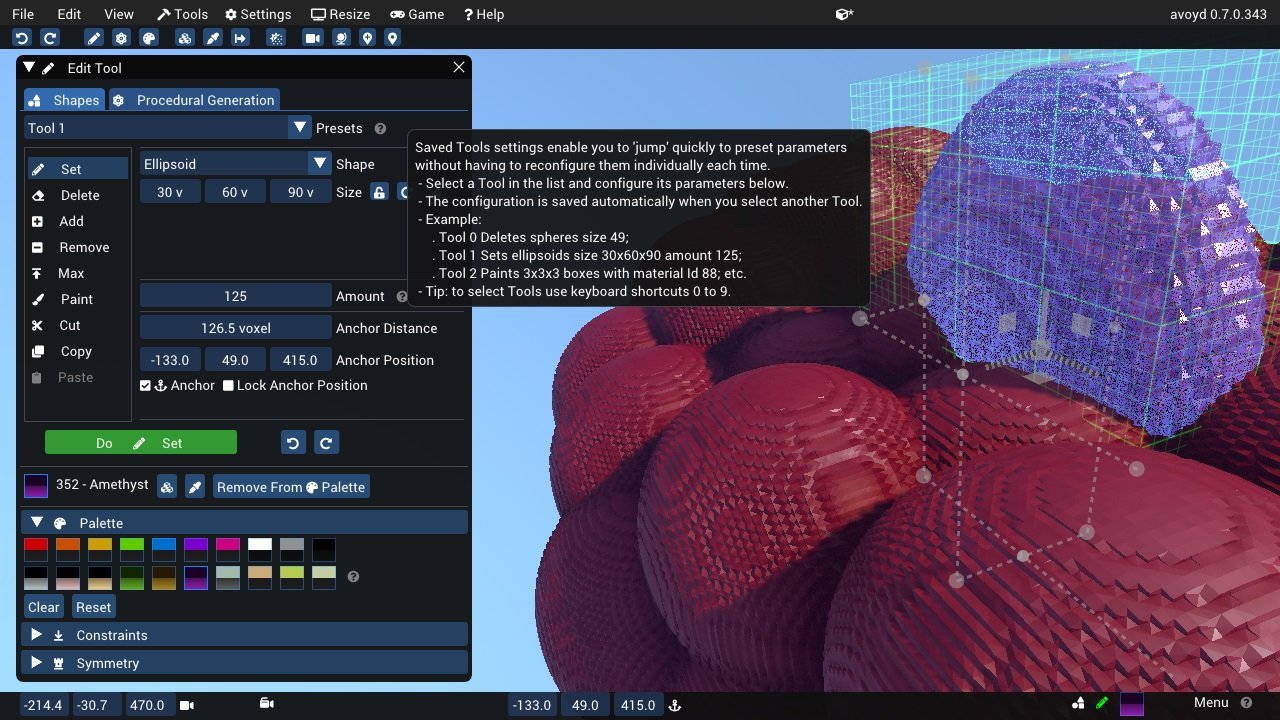 198 199 ##### [Return to Index](#index) 200 201 ## Using FreeType Rasterizer (imgui_freetype) 202 203 - Dear ImGui uses imstb\_truetype.h to rasterize fonts (with optional oversampling). This technique and its implementation are not ideal for fonts rendered at small sizes, which may appear a little blurry or hard to read. 204 - There is an implementation of the ImFontAtlas builder using FreeType that you can use in the [misc/freetype/](https://github.com/ocornut/imgui/tree/master/misc/freetype) folder. 205 - FreeType supports auto-hinting which tends to improve the readability of small fonts. 206 - Read documentation in the [misc/freetype/](https://github.com/ocornut/imgui/tree/master/misc/freetype) folder. 207 - Correct sRGB space blending will have an important effect on your font rendering quality. 208 209 ##### [Return to Index](#index) 210 211 ## Using Colorful Glyphs/Emojis 212 213 - Rendering of colored emojis is only supported by imgui_freetype with FreeType 2.10+. 214 - You will need to load fonts with the `ImGuiFreeTypeBuilderFlags_LoadColor` flag. 215 - Emojis are frequently encoded in upper Unicode layers (character codes >0x10000) and will need dear imgui compiled with `IMGUI_USE_WCHAR32`. 216 - Not all types of color fonts are supported by FreeType at the moment. 217 - Stateful Unicode features such as skin tone modifiers are not supported by the text renderer. 218 219 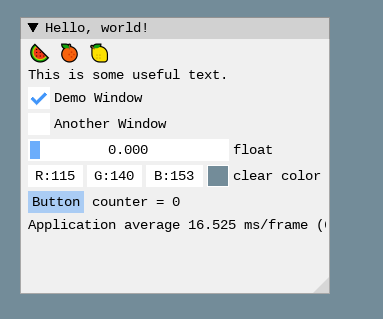 220 221 ```cpp 222 io.Fonts->AddFontFromFileTTF("../../../imgui_dev/data/fonts/NotoSans-Regular.ttf", 16.0f); 223 static ImWchar ranges[] = { 0x1, 0x1FFFF, 0 }; 224 static ImFontConfig cfg; 225 cfg.OversampleH = cfg.OversampleV = 1; 226 cfg.MergeMode = true; 227 cfg.FontBuilderFlags |= ImGuiFreeTypeBuilderFlags_LoadColor; 228 io.Fonts->AddFontFromFileTTF("C:\\Windows\\Fonts\\seguiemj.ttf", 16.0f, &cfg, ranges); 229 ``` 230 231 ##### [Return to Index](#index) 232 233 ## Using Custom Glyph Ranges 234 235 You can use the `ImFontGlyphRangesBuilder` helper to create glyph ranges based on text input. For example: for a game where your script is known, if you can feed your entire script to it and only build the characters the game needs. 236 ```cpp 237 ImVector<ImWchar> ranges; 238 ImFontGlyphRangesBuilder builder; 239 builder.AddText("Hello world"); // Add a string (here "Hello world" contains 7 unique characters) 240 builder.AddChar(0x7262); // Add a specific character 241 builder.AddRanges(io.Fonts->GetGlyphRangesJapanese()); // Add one of the default ranges 242 builder.BuildRanges(&ranges); // Build the final result (ordered ranges with all the unique characters submitted) 243 244 io.Fonts->AddFontFromFileTTF("myfontfile.ttf", size_in_pixels, NULL, ranges.Data); 245 io.Fonts->Build(); // Build the atlas while 'ranges' is still in scope and not deleted. 246 ``` 247 248 ##### [Return to Index](#index) 249 250 ## Using Custom Colorful Icons 251 252 As an alternative to rendering colorful glyphs using imgui_freetype with `ImGuiFreeTypeBuilderFlags_LoadColor`, you may allocate your own space in the texture atlas and write yourself into it. **(This is a BETA api, use if you are familiar with dear imgui and with your rendering backend)** 253 254 - You can use the `ImFontAtlas::AddCustomRect()` and `ImFontAtlas::AddCustomRectFontGlyph()` api to register rectangles that will be packed into the font atlas texture. Register them before building the atlas, then call Build()`. 255 - You can then use `ImFontAtlas::GetCustomRectByIndex(int)` to query the position/size of your rectangle within the texture, and blit/copy any graphics data of your choice into those rectangles. 256 - This API is beta because it is likely to change in order to support multi-dpi (multiple viewports on multiple monitors with varying DPI scale). 257 258 #### Pseudo-code: 259 ```cpp 260 // Add font, then register two custom 13x13 rectangles mapped to glyph 'a' and 'b' of this font 261 ImFont* font = io.Fonts->AddFontDefault(); 262 int rect_ids[2]; 263 rect_ids[0] = io.Fonts->AddCustomRectFontGlyph(font, 'a', 13, 13, 13+1); 264 rect_ids[1] = io.Fonts->AddCustomRectFontGlyph(font, 'b', 13, 13, 13+1); 265 266 // Build atlas 267 io.Fonts->Build(); 268 269 // Retrieve texture in RGBA format 270 unsigned char* tex_pixels = NULL; 271 int tex_width, tex_height; 272 io.Fonts->GetTexDataAsRGBA32(&tex_pixels, &tex_width, &tex_height); 273 274 for (int rect_n = 0; rect_n < IM_ARRAYSIZE(rect_ids); rect_n++) 275 { 276 int rect_id = rects_ids[rect_n]; 277 if (const ImFontAtlas::CustomRect* rect = io.Fonts->GetCustomRectByIndex(rect_id)) 278 { 279 // Fill the custom rectangle with red pixels (in reality you would draw/copy your bitmap data here!) 280 for (int y = 0; y < rect->Height; y++) 281 { 282 ImU32* p = (ImU32*)tex_pixels + (rect->Y + y) * tex_width + (rect->X); 283 for (int x = rect->Width; x > 0; x--) 284 *p++ = IM_COL32(255, 0, 0, 255); 285 } 286 } 287 } 288 ``` 289 290 ##### [Return to Index](#index) 291 292 ## Using Font Data Embedded In Source Code 293 294 - Compile and use [binary_to_compressed_c.cpp](https://github.com/ocornut/imgui/blob/master/misc/fonts/binary_to_compressed_c.cpp) to create a compressed C style array that you can embed in source code. 295 - See the documentation in [binary_to_compressed_c.cpp](https://github.com/ocornut/imgui/blob/master/misc/fonts/binary_to_compressed_c.cpp) for instruction on how to use the tool. 296 - You may find a precompiled version binary_to_compressed_c.exe for Windows instead of demo binaries package (see [README](https://github.com/ocornut/imgui/blob/master/docs/README.md)). 297 - The tool can optionally output Base85 encoding to reduce the size of _source code_ but the read-only arrays in the actual binary will be about 20% bigger. 298 299 Then load the font with: 300 ```cpp 301 ImFont* font = io.Fonts->AddFontFromMemoryCompressedTTF(compressed_data, compressed_data_size, size_pixels, ...); 302 ``` 303 or 304 ```cpp 305 ImFont* font = io.Fonts->AddFontFromMemoryCompressedBase85TTF(compressed_data_base85, size_pixels, ...); 306 ``` 307 308 ##### [Return to Index](#index) 309 310 ## About filenames 311 312 **Please note that many new C/C++ users have issues their files _because the filename they provide is wrong_.** 313 314 Two things to watch for: 315 - Make sure your IDE/debugger settings starts your executable from the right working directory. In Visual Studio you can change your working directory in project `Properties > General > Debugging > Working Directory`. People assume that their execution will start from the root folder of the project, where by default it oftens start from the folder where object or executable files are stored. 316 ```cpp 317 // Relative filename depends on your Working Directory when running your program! 318 io.Fonts->AddFontFromFileTTF("MyImage01.jpg", ...); 319 320 // Load from the parent folder of your Working Directory 321 io.Fonts->AddFontFromFileTTF("../MyImage01.jpg", ...); 322 ``` 323 - In C/C++ and most programming languages if you want to use a backslash `\` within a string literal, you need to write it double backslash `\\`. At it happens, Windows uses backslashes as a path separator, so be mindful. 324 ```cpp 325 io.Fonts->AddFontFromFileTTF("MyFiles\MyImage01.jpg", ...); // This is INCORRECT!! 326 io.Fonts->AddFontFromFileTTF("MyFiles\\MyImage01.jpg", ...); // This is CORRECT 327 ``` 328 In some situations, you may also use `/` path separator under Windows. 329 330 ##### [Return to Index](#index) 331 332 ## Credits/Licenses For Fonts Included In Repository 333 334 Some fonts files are available in the `misc/fonts/` folder: 335 336 **Roboto-Medium.ttf**, by Christian Robetson 337 <br>Apache License 2.0 338 <br>https://fonts.google.com/specimen/Roboto 339 340 **Cousine-Regular.ttf**, by Steve Matteson 341 <br>Digitized data copyright (c) 2010 Google Corporation. 342 <br>Licensed under the SIL Open Font License, Version 1.1 343 <br>https://fonts.google.com/specimen/Cousine 344 345 **DroidSans.ttf**, by Steve Matteson 346 <br>Apache License 2.0 347 <br>https://www.fontsquirrel.com/fonts/droid-sans 348 349 **ProggyClean.ttf**, by Tristan Grimmer 350 <br>MIT License 351 <br>(recommended loading setting: Size = 13.0, GlyphOffset.y = +1) 352 <br>http://www.proggyfonts.net/ 353 354 **ProggyTiny.ttf**, by Tristan Grimmer 355 <br>MIT License 356 <br>(recommended loading setting: Size = 10.0, GlyphOffset.y = +1) 357 <br>http://www.proggyfonts.net/ 358 359 **Karla-Regular.ttf**, by Jonathan Pinhorn 360 <br>SIL OPEN FONT LICENSE Version 1.1 361 362 ##### [Return to Index](#index) 363 364 ## Font Links 365 366 #### ICON FONTS 367 368 - C/C++ header for icon fonts (#define with code points to use in source code string literals) https://github.com/juliettef/IconFontCppHeaders 369 - FontAwesome https://fortawesome.github.io/Font-Awesome 370 - OpenFontIcons https://github.com/traverseda/OpenFontIcons 371 - Google Icon Fonts https://design.google.com/icons/ 372 - Kenney Icon Font (Game Controller Icons) https://github.com/nicodinh/kenney-icon-font 373 - IcoMoon - Custom Icon font builder https://icomoon.io/app 374 375 #### REGULAR FONTS 376 377 - Google Noto Fonts (worldwide languages) https://www.google.com/get/noto/ 378 - Open Sans Fonts https://fonts.google.com/specimen/Open+Sans 379 - (Japanese) M+ fonts by Coji Morishita http://mplus-fonts.sourceforge.jp/mplus-outline-fonts/index-en.html 380 381 #### MONOSPACE FONTS 382 383 Pixel Perfect: 384 - Proggy Fonts, by Tristan Grimmer http://www.proggyfonts.net or http://upperbounds.net 385 - Sweet16, Sweet16 Mono, by Martin Sedlak (Latin + Supplemental + Extended A) https://github.com/kmar/Sweet16Font (also include an .inl file to use directly in dear imgui.) 386 387 Regular: 388 - Google Noto Mono Fonts https://www.google.com/get/noto/ 389 - Typefaces for source code beautification https://github.com/chrissimpkins/codeface 390 - Programmation fonts http://s9w.github.io/font_compare/ 391 - Inconsolata http://www.levien.com/type/myfonts/inconsolata.html 392 - Adobe Source Code Pro: Monospaced font family for ui & coding environments https://github.com/adobe-fonts/source-code-pro 393 - Monospace/Fixed Width Programmer's Fonts http://www.lowing.org/fonts/ 394 395 Or use Arial Unicode or other Unicode fonts provided with Windows for full characters coverage (not sure of their licensing). 396 397 ##### [Return to Index](#index)